Your friend list on Facebook reveals various information than you might have thought of casually. People may judge you by your friend’s list which is not always right and hence you may prefer hiding your Facebook firned list. It is not only you who may look to hide your friend list on Facebook, as many Facebook users including your collegues, family members and your Facebook friends prefers keeping their freinds list on Facebook private so that no one would be able to see the same.
If you are also looking to keep your Facebook firend list private, you can get it done easily as Facebook allows you to see your friend list and control on who can see the list and from whom it would be hidden. You have the full control over your Facebook’s privacy settings.
This article explains how to hide your Facebook friend list in a quick and simple step-by-step guide along with the best Facebook privacy settings, using both mobile app in your phone and wesbite in 2025.
Why Hide Your Facebook Friend List?
Facebook friend list reflects a lot about the personality of a person and hence, they may want to hide their friend list on Facebook. In addition to this, there are various reasons why you should hide your Facebook friend list:
- It enhances privacy by limiting who can view your social media connection and network.
- It helps you avoid unwanted contact by preventing unknown users connecting with your freinds.
- It helps you improve security by reducing the risk of fake accounts on Facebook.
- Hiding Facebook friend list helps you maintain boundaries by keeping professional and private life different.
How to Hide Your Facebook Friend List on Mobile (iOS & Android)
If you use Facebook on your mobile and are looking to hide your Facebook friend list using the Facebok mobile app, you follow the steps mentioned in this post to adjust the privacy of your Facebook account and friend list on Facebook:
Step 1: Open the Facebook app on your mobile and log in to your account.
Step 2: Tap on the three horizontal lines (menu icon) at the top right corner.
Step 3: Go to settings by tapping on Settings & privacy from the menu.
Step 4: Scroll down to Audience and visibility section.
Step 5: Tap on How people find and contact you option.
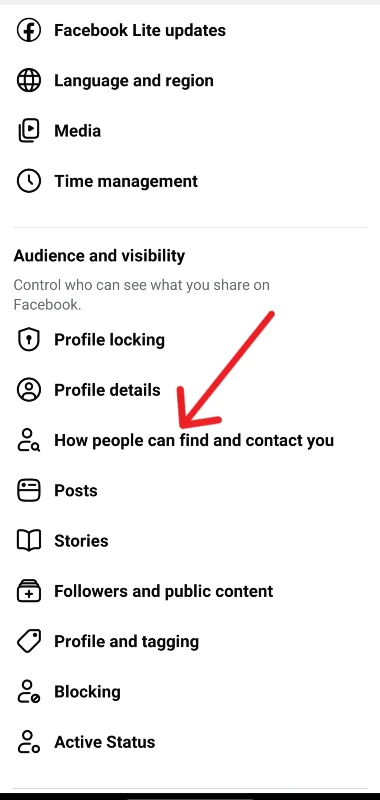
Step 6: Select Who can see your friends list?
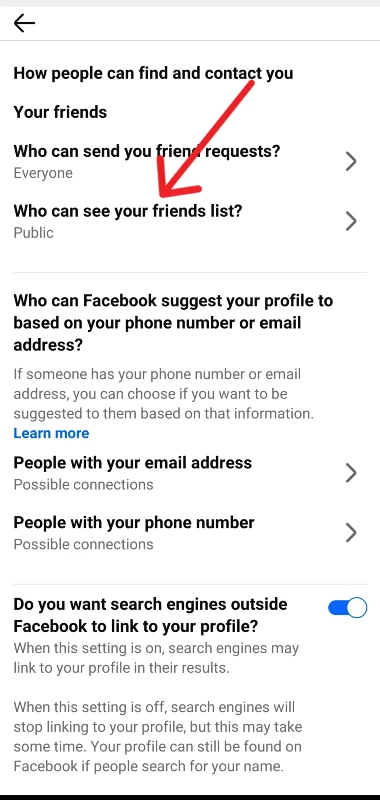
Step 7: From the available options choose the privacy option that you want for your friend list, such as Only Me, Friends, or Custom.
If you want to hide your friend list from everyone you shoulf select the option Only Me from available options.
How to Hide Your Facebook Friend List on Desktop
If you are a user who spends time on Facebbok using your computer or laptop, you must follow these steps to hide your Facebook friend list:
Step 1: Visit facebook.com on your browser and log in to your account.
Step 2: Click your profile picture or profile icon in the top-right corner.
Step 3: Click on Settings under Settings & privacy to see the settings options.
Step 4: From the settings menu, click on Privacy.
Step 5: Go to How people can find and contact you.
Step 6: Click on Who can see your friends list? and then select Edit.
Step 7: From the available options choose the privacy option that you would want, if you don’t want anyone to see your friend list, select Only Me.
You have the control over your Facebook’s privacy such that you can control who can see your friend list on facebook.
Additional Tips for Managing Facebook Privacy
You may have hidden your Facebook friend list, however users may still be able to see some of your friends on Facebook. You must, therefore check out the following tips to maintain privacy on Facebook.
- Make sure you check tagged posts as people may still be able to see your friends through posts tagged by other users on Facebook.
- Review your profile settings on Facebook and make changes to your personal details visibility.
- You can limit friend requests by controlling who can send you friend requests on Facebook.
- Review you account’s settings using the Facebook’s inbuilt Privacy Checkup tool.
Conclusion
If you are a user who is looking to strengthen your account privacy and control on your account’s activity and privacy, hiding your Facebook friend list is the simple and best way for the same. You can hide your friend list on Facebook using both the mobile app as well as facebook website on your browser on Phone or computer in a few simpe and easy steps.
You would have various privacy options on who can see your friend list on Facebook depending on your usage, such as if you want no one else except you to see your facebook friend list the you must select the Only Me option.