
It is very important for your to review your friend list on Snapchat for maintaining the privacy of your personal life as users tends to share their routine updates as snaps on Snapchat to thier friends. You may want to remove some users fro your friend list because you don’t want them to see your personal details but don’t want to block them as you don’t want them to knwo that you have removed them as your Snapchat friend.
Notably, Snapchat doesn’t let other users know that you have unfriended them or removed them from your friend list, however people may somehow doubt that you may have removed them when you no longer send them snaps, view their messages and so on. You must therefore, know the right way of deleting friends on Snapchat so that they don’t know you have removed them from the friend list.
This article explains how to delete friends on Snapchat without them knowing in a quick and simple step-by-step guide on both mobile and desktop in 2025.
Can You Delete a Friend on Snapchat Without Them Knowing?
Yes, it is possible for you to delete a friend from your friends’ list on Snapchat without the user knowing that you have removed them as your friend. Removing or deleting someone as your friend doesn’t notify the user about the same. Though, they might notice the changes if they try looking at your account, however, with the right steps you can reduce the chances of the user knowing about the deletion of your friends.
How to Delete Friends on Snapchat (iPhone & Android)
If you want to remove someone as your friend on Snapchat without them knowing using the Snapchat app on your phone, you must follow the steps mentioned below:
Step 1: Open the Snapchat app on your iPhone or Android device and login to your account.
Step 2: Tap on the Chat icon at the bottom of the screen to see the list of friends.
Step 3: Go to the chat of the friend whom you want to delete from your friend list.
Step 4: Tap and hol on the chat of the person whom you want to remove.
Step 5: Tap on Manage Friendship from the menu options on the screen.
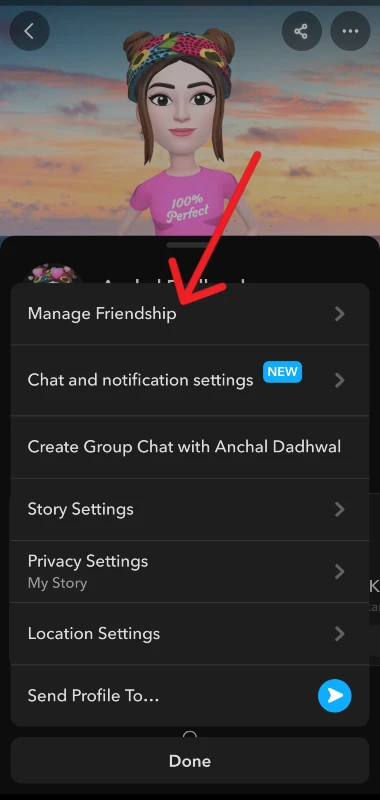
Step 6: Tap on Remove Friend and then confirm your choice to remove them as your friend.
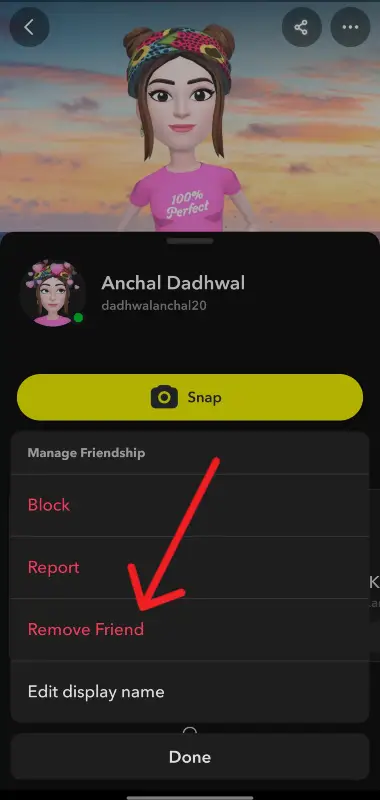
In this way, you would be able to easily delete your friends on Snapchat.
How to Reduce the Chances of Them Knowing
Now that you have removed user from your Snapchat friend list, follow these steps to reduce the chances of the user finding out that you have removed them as your friend:
Step 1: Go to Settings and Disable Quick Add visibility under Privacy Controls > See Me in Quick Add > Off.
Step 2: Do not open the chat of the user before removing them as your friend.
Step 3: Avoid blocking them as the user would be able to notice if you blocked them.
Step 4: Check for the privacy and visibility of your Story, Contact, and Location settings and set it to “Friends Only”.
What Happens After You Remove Someone?
You must know the following things before removing someone from your friend list on Snapchat. Once you delete a user from their friend list, then:
- They would no longer be able to view your private stories on Snapchat.
- Messages send by them would be shown as pending.
- The snapscore of you and that user would no longer be visible.
- The deleted friend would not get any alert or notification about you.
Alternative Option: Restrict Instead of Remove
If you do not want to block, remove, or delete a user in your friend list but at the same time don’t want them to see your snaps, stories and other personal information then:
- Mute their Story and notifications from their account by following the path their profile > three dots > Mute Story or Mute Notifications.
- When upload any story go to Custom and exclude that user from viewing your story.
Conclusion
It doesn’t take hard and fast rules to delete and remove someone from your Snapchat’s friend list as you can remove any user from your friends by following a few simple and easy steps. It is very important for you to know your privacy settings such that you can easily keep your informations private and limited to the individuals you want except the one deleted or removed from the friends. You just need to follow a few easy steps to manage your connections on Snapchat without letting them know that you have removed them from your friends list.