Every users loves spending their time watching reels and videos on Facebook. Facebook Watch automatically keeps the record of the reels and videos you watch on Facebook. Facebook Watch history is a very useful and helpful feature for users as it helps you find the videos that you have watched before on Facebook. However, not everyone wants their watch history to be stored and wants their activities to be deleted.
Deleting the Facebook watch history is a very important step to improve your privacy, reset video recommendations, and also keep an organized view of your activities on Facebook.
This article explains how to delete your Facebook Watch history in a quick and simple step-by-step guide along with the best Facebook privacy settings, control your watch history and expert tips in 2025.
Why Delete Facebook Watch History?
As discussed, deleting Facebook Watch history is primarally for privacy and new vedio recommendation. In addition to this, there are various reasons why you should clear their watch history for several:
- It helps you Improve Privacy by preventing users from seeing what you’ve watched.
- Deleting watch history Refresh Recommendations on Facebook helps you get rid of unwanted video suggestions.
- You get an organized Facebook viewing history by Cleaning Up Activity Log.
- Helps you Control Personal Data and improves your privacy on Facebook.
How to Delete Facebook Watch History on Mobile (iOS & Android)
Most of the Facebook’s users uses its mobile app on android or iOS. Follow the steps mentioned below to clear your Facebook’s Watch history using the Facebook app:
Step 1: Open the Facebook app and log in to your account on your iPhone or Android device.
Step 2: Tap the menu icon (three horizontal lines) on the front page.

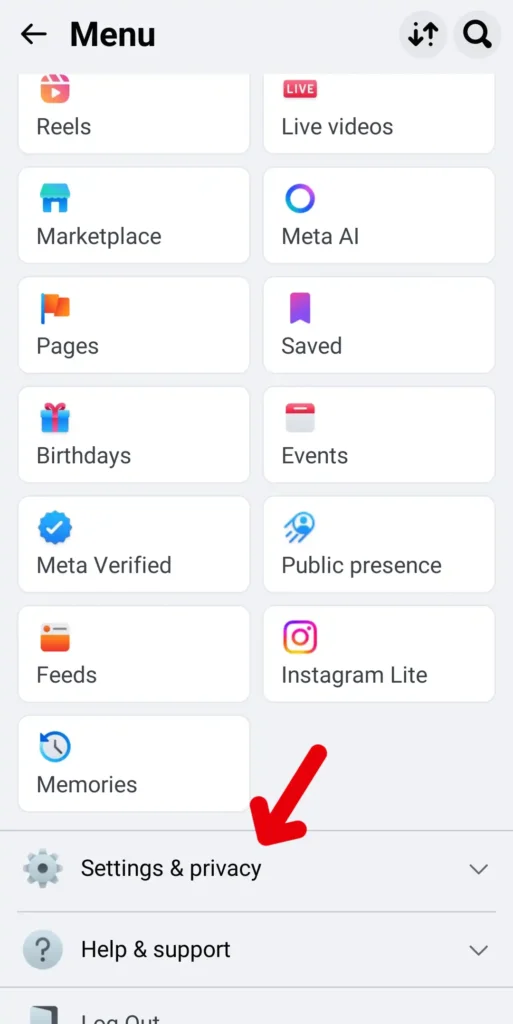
Step 3: Tap on Settings & privacy after scrolling down, and then click on Settings.
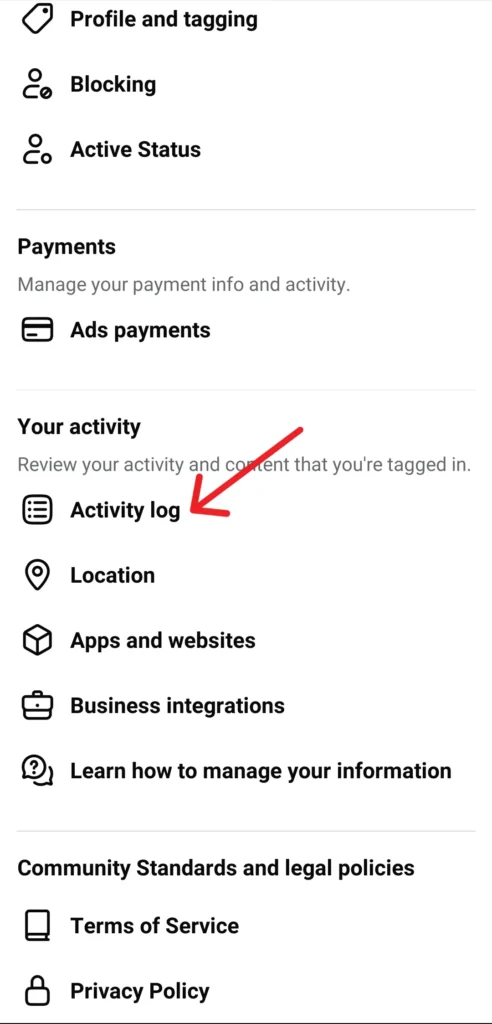
Step 4: Go to the Your information section and tap on Activity log.
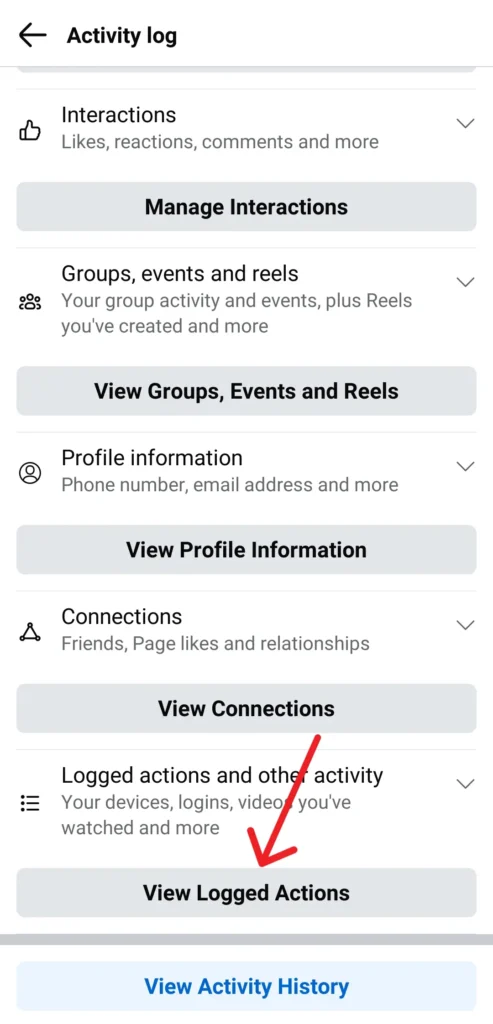
Step 5: Now, tap on Logged actions and other activity.
Step 6: Select Videos you’ve watched.
Step 7: Tap Clear video watch history to delete everything at once, or delete individual videos by tapping the three dots for each item.
In this way, you can delete the Facebook’s watch history all at once or delete some videos from hiisotry while saving some of them if you found them useful.
How to Delete Facebook Watch History on Desktop
If you are a user who prefers using a desktop or laptop fro browsing, follow these steps to clear your watch history on Facebook using a computer:
Step 1: Visit facebook.com on your browser and log in to your account on your computer.
Step 2: Click on your profile picture or profile icon in the top-right corner, then select Settings & privacy.
Step 3: From the available settings option in menu, choose Activity log.
Step 4: Go to the Logged actions and other activity section and click Videos you’ve watched .
Step 5: Click on Clear video watch history to delete everything at once, or delete the videos from the history individually.
In this way, you would be able to delete the videos that you’ve watched on facebook from its watch history.
How to Turn Off Facebook Watch History (If Available)
This option may not be always available for all the users, however, some accounts may have the option to pause watch history on Facebook. Follow these steps to check if you can pause your Facebook’s Watch history:
Step 1: Go to Activity log as stated in the aboved steps.
Step 2: Click on Videos you’ve watched.
Step 3: Tap or toggle on Pause watch history if the setting is visible.
If this option is availble, it would help you to stop from saving your watched videos in the activity section of facebook.
Tips for Managing Facebook Watch Activity
Facebook Watch history can be a very useful and helpful feature if you manage the same smartly. Follow these tips to properly manage your Facebook Watch history and activity.
- Check for your activities on Facebook regularly to know what is stored in the activity log by Facebook.
- If you want new video suggestion in your feed, clearing your search history and content preferences would help you in this case.
- You can clear videos from your watch history in the activity to get new type of video recommendations.
- If you use Facebook login to log on to any other apps, check if they store your watch data.
Conclusion
If you want to protect your privacy, control you account activity and refresh your video recommendation on Facebook deleting your Facebook Watch history would be the best approach and an effective way. You can clear your Facebook’s watch history from your Facebook app as well as facebook’s website on your browser on your phone or desktop. Follow the steps mentioned above to clear your videos watch history on Facebook through the Activity log.