Your Facebook friend list doesn’t automatically remove the freinds who have deactivated their account on Faceook, even though the account may not be visible on Facebook. Having deactive acccounts in your friend list for a longer time may result into the reduction to the engagement of your posts which in turn also affects the privacy of your account. Hence, users prefer removing the deactivated accounts from their Facebook friend list to keep their friend list updated and safe.
You may be looking to remove the deativated account from your friend list, but Facebook doesn’t have the inbuilt feature to detect and remove those account. This doesn’t mean that it is not possible to remove the deactivated accounts from your friend list, you just need to check the inactivea and deactivated accounts manually to make your friend list on Faceboon clean and organized.
This article explains how to find and remove deactivated friends from Facebook on both Android and iPhone in a quick and simple step-by-step guide and methods on both mobile and desktop in 2025.
Why You Should Remove Deactivated Friends
As discussed above you may be looking to remove inactive and deactivated friends from your Facebook friendlist, but you might also feel like not removing them would show more friend in your account. You should remove deactivated and inactive accounts from your faceboook account for the following reasons:
- You would have a clean and organized friend list with active accounts.
- THe privacy of your account with be better and you can control the same.
- With active users your account would have higher engament and better reach.
- Higher engagement from real, active users.
- You could keep some known deactived accounts which would later be activated.
How to Identify Deactivated Friends on Facebook
Though there is no direct way of identifying and removing deactivated friends on Facebook, but you can still identify and remove the deactivated accounts from your facebook account manually. Deactivated accounts on facebook are often shown without profile picture and account name as Facebook User or no name at all.
There are various methods with which you can check the deactivated accounts on your Facebook friend list. Here are the different methods which which you can remove the inactive account on Facebook.
Method 1: Check Your Friends List
The first thing you should do is to check your friend list and locate for the deactiavted accounts through these steps:
Step 1: Open Facebook and login to account on your phone or desktop.
Step 2: Go to your profile tab and click on Friends.
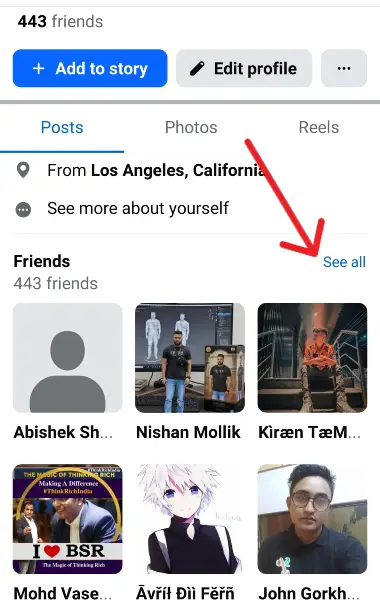
Step 3: Scroll through your friend list and check for accounts named “Facebook User” or accounts with no profile photo.
Step 4: You can confirm the same by tapping on that profile and it it shows a blank page or the page fails to open, then the account is deactivated.
Method 2: Check Through Messenger
You can also check for the inactivated and deactivated account on your friend list from the chats and messages section. Follow these steps to check your messenger:
Step 1: Open the Messenger app on your phone.
Step 2: Check your conversations with your friends.
Step 3: See for a chat with Facebook User snd a blank profile picture.
Step 4: To confirm the same tap on the profile snd it it does not load, the account is proved to be deactivated account.
How to Remove Deactivated Friends on Facebook
After the deactiavted accounts are identified by you from any one of the two methods mentioned above, the next thing you need to do is to remove them from your friend list. You can remove the inactive and deactived accounts from your facebook account through these stesp:
Step 1: Open Facebook App on your mobile and go to your Friends section.
Step 2: Go to the deactivated account labelled as “Facebook User” as stated in the above methods.
Step 3: Open the profile and tap on the three dots to see the options to remove them.
Step 4: Select Unfriend or remove friend.

Step 5: tap on confirm to remove the deactivated account permanently from your list.
Conclusion
Inactive and deactivated accounts on your facebook friend list reduces the account engagement and reach of your posts, and also keeps your Facebook friend list clean organized. Therefore, it is very important for your to find the inactive and deactive friends on your facebook account to maintain privacy and keep your account secured. You can remove the inactive accounts form your account through your friend list or messenger ad per your convinience, which is simple and easy as mentioned in the steps above.